Pages

Showing posts with label Computer Processing Tricks. Show all posts

How to create hard disk partition without formatting the data after installation of microsoft windows without any partition software[latest][2014]

How to create hard disk partition without formatting the data after installation of microsoft windows without any partition software[latest][2014]


hey guys the is android wheel today we are going to tell about how to create hard disk partition after the installation of microsoft windows without any data recovery softwares.the recovery softwares are sometimes becomes viruses,so here is the technique for you to create partition of your hard disk without formatting the data.
 Some times after the installation of new fresh  microsoft windows
you might face the problem "how to create partition ,shrink partition or extend the partition"
because this have to be done before the installation of  microsoft windows
but it can be done after the installation of microsoft windows
maybe you wanted the different partition for storing data or for back up purposes and several other recovery softwares etc.
Here is the solution for this..
Just follow my steps
step 1 . Right click on my computer icon


 Step2. click on storage>disk management


I have a partition of 140GB unallocated size and a drive of 10 GB which is full of data.


 See new volume D have some data in it.
 I'll extend 10 GB to 150 GB partition without formatting the data.

 Simply right click on drive and select Extend volume


Disk 0 is unallocated partition  which is automatically added to your partition .
click next and finished.

 Now see  partition is extended to 150 GB

 See the data is safe.
 Now i'm gonna show you how to shrink or reduce the partition size.

 Just right click on selected drive >shrink volume
 Enter the amount of space to shrink .
 see in snapshot the partition of 150 GB is shrinked to 50 GB
And now i have 100 GB unallocated space
As you see property of drive capacity is 50GB,used space is same as previous ones ..


How To Create A Google Chrome Extension


 Google chrome extensions looks so hard to create but they're not. If you've ever built a web page, you should feel right at home with extensions pretty quickly. You can create a extension with basic HTML/CSS/JavaScript knowledge. You don't need be an expert for this tutorial.


In this tutorial, I'll discus about create a full chrome extension, from it's beginning to end. I'll also explain every single file of our extension.

Change The Icon of Your USB Pendrive or Removable Disc

Change USB Icon


Change USB Icon
1. Before giving custom icon, your USB icon will be default according to your windows theme. My one was as below :Default icon of USB pendrive
Default icon of USB
Default Pendrive Icon
2. Now from menu bar(Menu bar is located at the top left side of your explorer. If you don’t see menubar, go to Organize > Layout > Mark Menu bar), go to Tools > Folder Options. Now go to View tab.
Go to Tools from MenuBar
3. Find out the option “Hide extension for known file types“. If it is checked, then uncheck it. It should look like below.
Uncheck "Hide extension for known file types"
Uncheck
4. Then click Apply and Ok.5. Now enter into your USb device. You have to make a new text file here. To do that, right click on your mouse. From right click menu, go to New > New Text document.Create a New Text Document
Create a New Text Document
6. Now rename your text document from “New text document.txt” to “autorun.inf”.Rename it into autorun.inf
Rename it into autorun.inf
7. After renaming the autorun.inf file should be look as above.
8. Now right click on autorun.inf file and select edit. Then it will open with notepad. Copy and paste the following code into that notepad and save(repalce existing file when saving) it.
[autorun]icon=rijans.ico Write the autorun code
Write the autorun code
9. Now you have to put an ico file(icon file which has *.ico extension) in the same place where your autorun.inf file is located. After puting ico file beside the inf file, rename the ico file into rijans.ico . Then your window will look like below. Give custom icon to usb device
Give custom icon to usb device
10. Now you are done. Now to check, open your pen drive from computer then again plug to computer. Look your icon is changed. Note: 1. You have to use icon file. Not image. 2. You can use any icon you want. 3. If you have any image, then convert that image into ico file with icon creator software. 4. You are commended to use 256*256 ratio icon. 5. Your icon name and icon name in autorun.inf shoul be same. For example, if your icon name is techgainer.com.ico then the code should be asNote:1. You have to use icon file. Not image.2. You can use any icon you want.3. If you have any image, then convert that image into ico file with icon creator software.4. You are commended to use 256*256 ratio icon.5. Your icon name and icon name in autorun.inf shoul be same. For example, if your icon name is pcsfix.ico then the code should be as[autorun]icon=techtricksandtweeks.blogspot.in.ico6. If you don’t have icon or icon creator tool then download icon samples from vistaicons.com .
7. Your anti-virus may disturb you. Because anti-viruses treat autorun.inf file as virus assistant.


stop Windows Error Reporting


Try disabling the Windows Error Reporting service: http://img441.imageshack.us/img441/5880/hatag.png

Press the Windows key + R to open a Run box.

Type services.msc

Press Enter.

Scroll down to the Windows Error Reporting service. Double-click it, Stop it and Disable it.


If this is not working 
See article Stop Error RePorting in windows

Stop Windows Error Reporting Permanently


Disable Error Reporting in XP, Vista, and Windows 7

When you’re trying to fix a computer or are setting it up for certain functionality for a business, it can be quite annoying always getting error messages when you know what your doing. Today we take a look at disabling those messages in XP, Vista, and Windows 7.
Note: Error Reporting can be valuable if Windows isn’t working correctly and shouldn’t be disabled unless you’re a system admin or power user. This is not recommended for the average home user. 
sshot-2009-12-19-[23-57-18]
Error Reporting is enabled by default on XP, Vista, and Windows 7. If an error occurs, a detailed message regarding the error pops up and you’re prompted to send the information to Microsoft. This is so they can gather error info from millions of PC’s and helps them create patches and Service Packs. In some cases it will check the error and provide solutions to fix it. When you’re setting up a machine for specific functionality, the messages get very annoying. There are a number of reasons why an experienced user or tech would want to turn them off, so lets begin.
Disable Error Reporting in Windows 7
Open up the start menu and type in problem reporting settings into the search box, or head to Action Center –> Change Action Center Settings –> Problem Reporting Settings. If you used the search, use the “Choose how to report problems” item in the list:
Then you can easily choose the option from the list:
Again, you probably should leave it enabled, but this will let you disable it.
Disable Error Reporting in Windows 7 with Group Policy
Note: This method used Local Group Policy Editor which isn’t available in Home versions of Windows 7.
Click on Start and enter gpedit.msc into the search box and hit Enter.
Local Group Policy Editor opens and you want to navigate to User Configuration \ Administrative Templates \ Windows Components \ Windows Error Reporting and under Setting double click on Disable Windows Error Reporting.
 
Change it from Not Configured to Enabled, then click Apply and Ok and close out of Local Group Policy Editor.
Disable Error Reporting in Vista
To disable Error Reporting in Vista click on Start and open Control Panel.
Make sure you’re in Classic View and double click on Problem Reports and Solutions.
Under Tasks click on the Change Settings link.
 
It’s worth noting here that if you choose Ask me to check if a problem occurs, error reporting is enabled but you get to choose whether or not to send the diagnostics to Microsoft. If you select Check for solutions automatically (recommended) then all data will be sent to Microsoft automatically. Since we want to disable it all together, click on theAdvanced Settings link.
In the next screen under For my programs, problem reporting is…select Off then click Ok to close out of the Problem Reports and Solutions window.
 
Next you’ll see that everything under Choose how to check for solutions to computer problems is grayed out. Click Ok to close out of this screen.
Click Close on the message telling you that Error Reporting is turned off.
Disable Error Reporting in XP
To disable error reporting in XP right click on My computer and select Properties. In theSystem Properties window click the Advanced tab then the Error Reporting button.
The Error Reporting window comes up where you want to select Disable error reporting. Uncheck the box But notify me when critical error occur if you don’t want to see any errors at all then click Ok and Ok to close out of the System Properties window.

Virtual Laser Keyboard


The Virtual Laser Keyboard (Celluon Magic Cube) is a revolutionary accessory (The only keyboard that operates in total darkness) for Iphone, Ipad, Smartphone, PDA, MAC & Tablet PC and any device that operates Bluetooth HID. The VKB (Celluon Magic Cube) is the perfect business / Christmas gift (and just what you want to take out of your inner suit pocket in front of your amazed business colleagues...:-) 

Spyware – Knowledge base

There are a lot of PC users that know little about “Spyware”, “Mal-ware”, “hijackers”, “Dialers” & many more. This will help you avoid pop-ups, spammers and all those baddies.
What is spy-ware?
Spy-ware is Internet jargon for Advertising Supported software (Ad-ware). It is a way for shareware authors to make money from a product, other than by selling it to the users. There are several large media companies that offer them to place banner ads in their products in exchange for a portion of the revenue from banner sales. This way, you don’t have to pay for the software and the developers are still getting paid. If you find the banners annoying, there is usually an option to remove them, by paying the regular licensing fee.
Known spywares
There are thousands out there, new ones are added to the list everyday. But here are a few:
Alexa, Aureate/Radiate, BargainBuddy, ClickTillUWin, Conducent Timesink, Cydoor, Comet Cursor, eZula/KaZaa Toptext, Flashpoint/Flashtrack, Flyswat, Gator, GoHip, Hotbar, ISTbar, Lions Pride Enterprises/Blazing Logic/Trek Blue, Lop (C2Media), Mattel Brodcast, Morpheus, NewDotNet, Realplayer, Songspy, Xupiter, Web3000, WebHancer, Windows Messenger Service.
How to check if a program has spyware?
The is this Little site that keeps a database of programs that are known to install spyware.
If you would like to block pop-ups (IE Pop-ups).
There tons of different types out there, but these are the 2 best, i think.
Try: Google Toolbar (http://toolbar.google.com/) This program is Free
Try: AdMuncher (http://www.admuncher.com) This program is Shareware
If you want to remove the “spyware” try these.
Try: Lavasoft Ad-Aware (http://www.lavasoftusa.com/) This program is Free
Info: Ad-aware is a multi spyware removal utility, that scans your memory, registry and hard drives for known spyware components and lets you remove them. The included backup-manager lets you reinstall a backup, offers and multi language support.
Try: Spybot-S&D (http://www.safer-networking.org/) This program is Free
Info: Detects and removes spyware of different kinds (dialers, loggers, trojans, user tracks) from your computer. Blocks ActiveX downloads, tracking cookies and other threats. Over 10,000 detection files and entries. Provides detailed information about found problems.
Try: BPS Spyware and Adware Remover (http://www.bulletproofsoft.com/spyware-remover.html) This program is Shareware
Info: Adware, spyware, trackware and big brotherware removal utility with multi-language support. It scans your memory, registry and drives for known spyware and lets you remove them. Displays a list and lets you select the items you’d like to remove.
Try: Spy Sweeper v2.2 (http://www.webroot.com/wb/products/spysweeper/index.php) This program is Shareware
Info: Detects and removes spyware of different kinds (dialers, loggers, trojans, user tracks) from your computer.
The best scanner out there, and updated all the time.
Try: HijackThis 1.97.7 (http://www.spywareinfo.com/~merijn/downloads.html) This program is Freeware
Info: HijackThis is a tool, that lists all installed browser add-on, buttons, startup items and allows you to inspect them, and optionally remove selected items.
If you would like to prevent “spyware” being install.
Try: SpywareBlaster 2.6.1 (http://www.wilderssecurity.net/spywareblaster.html) This program is Free
Info: SpywareBlaster doesn`t scan and clean for so-called spyware, but prevents it from being installed in the first place. It achieves this by disabling the CLSIDs of popular spyware ActiveX controls, and also prevents the installation of any of them via a webpage.
Try: SpywareGuard 2.2 (http://www.wilderssecurity.net/spywareguard.html) This program is Free
Info: SpywareGuard provides a real-time protection solution against so-called spyware. It works similar to an anti-virus program, by scanning EXE and CAB files on access and alerting you if known spyware is detected.
Try: XP-AntiSpy (http://www.xp-antispy.org/) This program is Free
Info: XP-AntiSpy is a small utility to quickly disable some built-in update and authentication features in WindowsXP that may rise security or privacy concerns in some people.
Try: SpySites (http://camtech2000.net/Pages/SpySites_Prog…ml#SpySitesFree) This program is Free
Info: SpySites allows you to manage the Internet Explorer Restricted Zone settings and easily add entries from a database of 1500+ sites that are known to use advertising tracking methods or attempt to install third party software.
If you would like more Information about “spyware”.
Check these sites.
Usefull tools…
Try: Stop Windows Messenger Spam 1.10 (http://www.jester2k.pwp.blueyonder.co.uk/j…r2ksoftware.htm) This program is Free
Info: “Stop Windows Messenger Spam” stops this Service from running and halts the spammers ability to send you these messages.
—————————————————————————-
All these softwares will help remove and prevent evil spammers and spywares attacking your PC. I myself recommend getting “spyblaster” “s&d spybot” “spy sweeper” & “admuncher” to protect your PC. A weekly scan is also recommended
Free Virus Scan
Scan for spyware, malware and keyloggers in addition to viruses, worms and trojans. New threats and annoyances are created faster than any individual can keep up with.
http://defender.veloz.com// – 
Finding . is a Click Away at 2020Search.com
Having trouble finding what you re looking for on: .? 2020Search will instantly provide you with the result you re looking for by drawing on some of the best search engines the Internet has to offer. Your result is a click away!
http://www.2020search.com// – 
Download the BrowserVillage Toolbar.
Customize your Browser! Eliminate Pop-up ads before they start, Quick and easy access to the Web, and much more. Click Here to Install Now!
http://www.browservillage.com/ – 

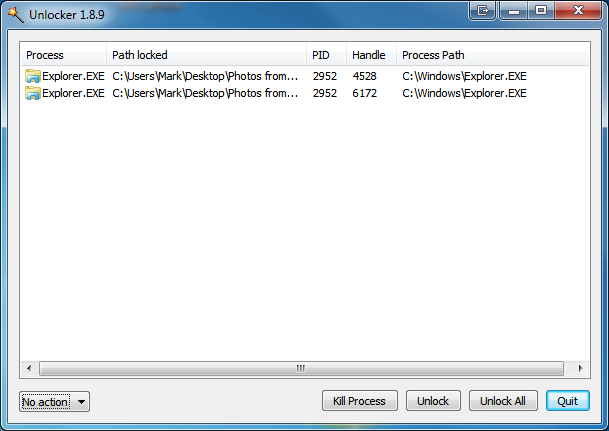
Error Deleting File Or Folder, Cannot Delete Folder: It’s Being Used By Another Person Or Program


Unlocker 1.8.7
Unlocker application was designed to be a very useful Windows Explorer extension allowing users with a simple right-click on a file or folder to easily get rid of error message such as error deleting file or folder, cannot delete folder: it’s being u
Helps delete locked files with error messages like:

Check Your Antivirus Software


How to Check Your Antivirus Software Working Or Not?


Have u ever wondered if ur Anti-virus Software is really working ? Here is a safe way to test it, and u dont need a real virus sample to test it.


Open NOTEPAD, copy the text below and paste it in NOTEPAD. Save as EICAR.COM


X5O!P%@AP[4\PZX54(P^)7CC)7}$EICAR-STANDARD-ANTIVIRUS-TEST-FILE!$H+H*

Increase Computer Speed


These tips will help you to increase your Desktop or Laptops speed and make your system quick

It includes to main steps .

  • 1.Increase virtual Ram (Paging)
  • 2.Check for errors, Analyze and defragment.
  •  3. Deleting %temp% and temp
Increase virtual Ram (Paging) It will increase the virtual Ram .just follow the steps

How to change your facebook theme


Bored with the same BLUE&WHITE facebook theme This is a very cool trick to change theme of your facebook profile and make it cool ... just look at my facebook page  below ... is'nt it looking cool..! huuha now i'll explain you how to do it in this post ....


After  INSTALLING THEME